

To run Artie with DocumentDB, you must have SSH tunnels enabled or use BYOC with VPC peering as DocumentDB only allows access within your VPC.
Required settings
- Cluster endpoint
- Port (default is
27017) - Service account
- Database name (ensure the database has change stream enabled)
Need help finding the cluster endpoint?
Need help finding the cluster endpoint?
You can find the cluster endpoint by going to the AWS console, selecting the DocumentDB cluster and go to the “Configuration” tab.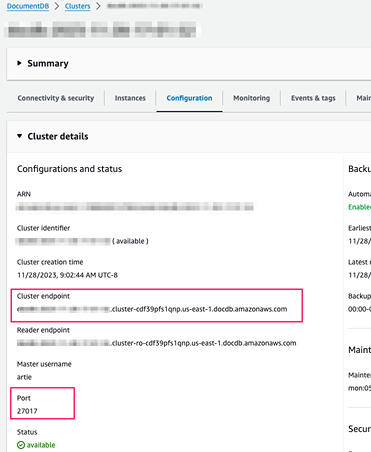
Setting up change streams and a service account
setup.js
Advanced
Cast all columns to string
Cast all columns to string
DocumentDB collections have no enforced schema, so different documents can store the same field with different types. By default, Artie infers the column type from the first non-null value it sees. If a later document stores that field with a different type, Artie lands the column as a string.The Cast all columns to string setting makes this explicit: every column is stored as a string as it is discovered, regardless of the underlying BSON type. Nested objects are stored as JSON strings.This setting applies to new columns as they are discovered. Existing destination columns keep their current types. To cast all columns as strings on a pipeline with an existing destination table, rebuild the table after enabling this setting.You can enable this from your pipeline’s destination advanced settings.