

Before you begin
You will need:- A PlanetScale account with access to the database you want to replicate
- Permission to create database passwords in the PlanetScale console
Setup
1
Create a database password
In the PlanetScale console, go to your database and select Settings → Passwords → New password.Set the Role to Read-only. This is the least-privilege role needed — it grants 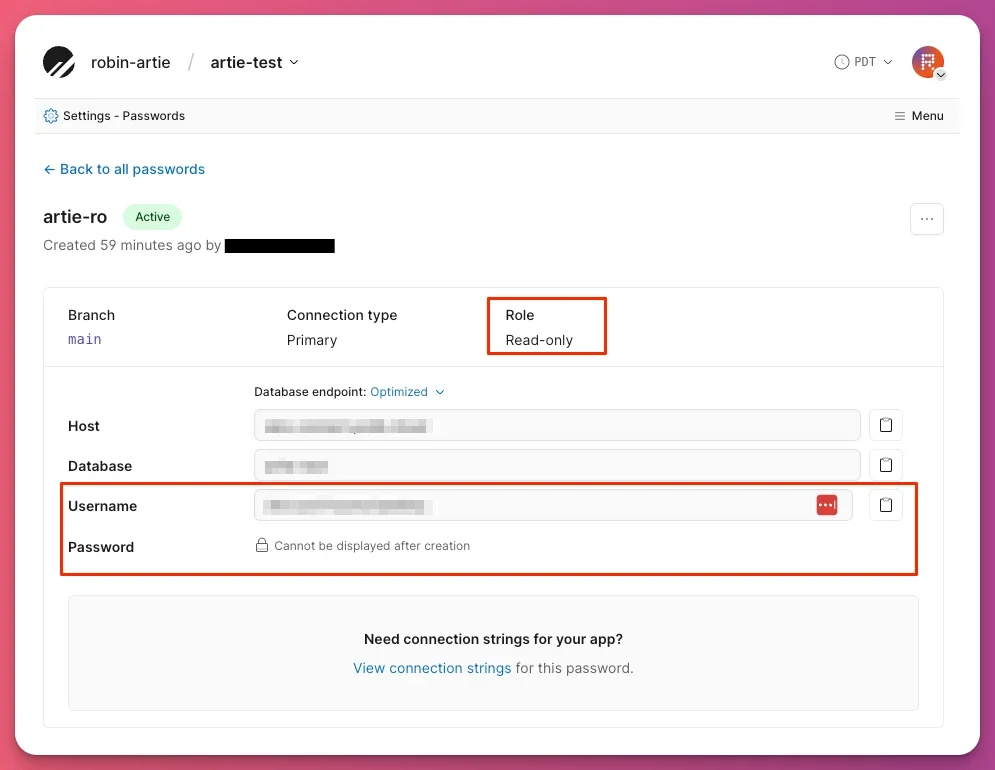
SELECT access for snapshot backfills and VStream CDC access for ongoing replication.2
Add PlanetScale as a source in Artie
In the Artie dashboard, create a new pipeline and select PlanetScale as the source. Enter the credentials from the previous step:
TLS is enforced automatically — no additional configuration is needed.
3
Choose tables and keyspaces
Select the tables to replicate. Artie identifies each PlanetScale table by its keyspace and table name, so you can choose the specific source table.By default, tables from different keyspaces replicate to separate destination tables. If the same logical table exists in multiple keyspaces and should land in one destination table, use Keyspaces → Unify across keyspaces in the pipeline settings.
Frequently asked questions
Does Artie use MySQL binlog for PlanetScale?
No. Artie uses the Vitess VStream gRPC API for PlanetScale CDC, not MySQL binary log replication. You do not need to configurebinlog_format, set binlog retention, or grant REPLICATION CLIENT or REPLICATION SLAVE privileges.
What role does the database password need?
Read-only is sufficient for both snapshot backfills and ongoing CDC. Do not use Read/Write or Admin roles.Is GTID required?
No. VStream-based CDC does not use GTID.Are read replicas supported?
No. PlanetScale handles read routing internally — no replica configuration is needed on the Artie side.What MySQL version does PlanetScale expose?
PlanetScale exposes a MySQL 8.0-compatible interface via the Vitess layer.Advanced
Unify the same table across keyspaces
Unify the same table across keyspaces
Use Unify across keyspaces when the same logical table exists in multiple PlanetScale keyspaces and you want Artie to replicate them into one destination table.Choose one keyspace selection method:
- Allow list: Select the exact keyspaces to unify. Add a new keyspace to the pipeline and run a manual backfill when you want to include it.
- Regular expression: Match keyspace names with a regex, such as
^customer_(us|eu)$. New matching keyspaces are detected after the pipeline is deployed and begin streaming automatically. Discovery runs at most every five minutes. Artie backfills the new keyspace before streaming so changes made while it was being discovered are not lost.
Replicate a sharded keyspace
Replicate a sharded keyspace
Artie supports tables in sharded PlanetScale keyspaces. Select the keyspace and table in the pipeline, and Artie reads changes across its serving shards. You do not configure individual shards.You can unify a selected sharded keyspace with compatible tables from other selected keyspaces through either an allow list or a regular expression. When a new keyspace matches a regex, Artie automatically discovers it, backfills it, and begins streaming it. Discovery runs at a configurable cadence, so changes made before Artie starts streaming are included in the backfill.
How PlanetScale CDC works
How PlanetScale CDC works
PlanetScale CDC uses the Vitess VStream gRPC API rather than MySQL binary log replication. VStream is a change stream protocol built into Vitess that surfaces row-level changes without requiring direct binlog access.This means Artie does not need replication privileges, binlog configuration, or GTID — all of which are required for standard MySQL CDC. TLS is always enforced on PlanetScale connections; Artie sets this automatically.