
Why destination type matters
Every flush carries a fixed overhead cost: staging table creation time, time spent merging the data and any clean up work. The key to tuning flush rules is understanding how that fixed cost relates to your destination type. Both OLAP and OLTP destinations follow the same general flush pattern: The difference is how much latency each step adds. OLAP destinations (Snowflake, BigQuery, Databricks, Redshift) add significantly more latency per flush. Staging requires uploading files to cloud storage, DDL operations in a warehouse are slow, and, most important, the MERGE step often scans most of the destination table, because OLAP databases don’t index primary keys. A merge predicate on a cluster or partition key can cut that down. With small batches, this fixed latency dominates:
OLTP destinations (PostgreSQL, MySQL, SQL Server) go through the same steps, but transactional databases have B-tree indexes on primary keys, so the MERGE uses fast index lookups instead of table scans. Combined with lightweight DDL operations, the fixed overhead per flush is low enough that smaller, more frequent flushes work well.
Recommended configurations
- OLAP destinations
- OLTP destinations
For analytical databases like Snowflake, Databricks, BigQuery, or Redshift:Example configuration: start with the Balanced preset (3 min, 1M changed records, 125 MB) or Write less often (15 min, 1M changed records, 125 MB). For higher volume, raise Batch size toward 500 MB.On Snowflake, you can turn on multi-step merge for tables with very high write throughput. It’s also available on MotherDuck and Iceberg.
Recommended approach
Larger, less frequent flushes are optimal because:
- Columnar storage benefits from batch processing
- Reduced metadata overhead and better compression
- More efficient query performance with fewer small files
Debugging high latency
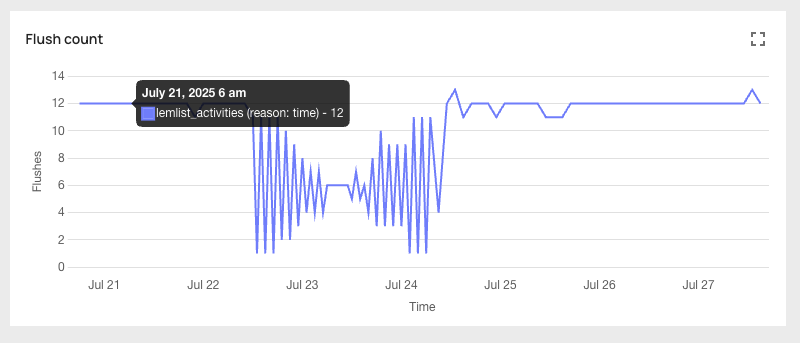
If your pipeline latency is higher than expected, use the Flush count chart on the Analytics page to see which limit triggers flushes (size, rows, time, or memory), then adjust accordingly.
- OLAP destinations
- OLTP destinations
1
Check the flush reason
Look at the Flush count chart to see which condition is triggering flushes.
2
If the reason is size or rows
Your flushes are triggering before enough data accumulates, producing small batches with high per-row overhead. Raise the limits so more data lands per flush:
- Changed records: raise above the 1M default
- Batch size: raise toward 500 MB
3
If the reason is time
Increase the time interval (e.g., from 3 minutes to 10-15 minutes). This may seem counterintuitive, but waiting longer allows more data to accumulate per flush, which increases overall throughput by amortizing the fixed merge overhead across a larger batch.
Monitoring
You can see which flush rule triggered each flush in the analytics portal: