

Required settings
- Table bucket ARN
- AWS region
- AWS access key ID and secret access key (from the script below)
Find table bucket ARN
Find table bucket ARN
To find your table bucket ARN, go to your AWS console, click on S3 and navigate to the table bucket tab.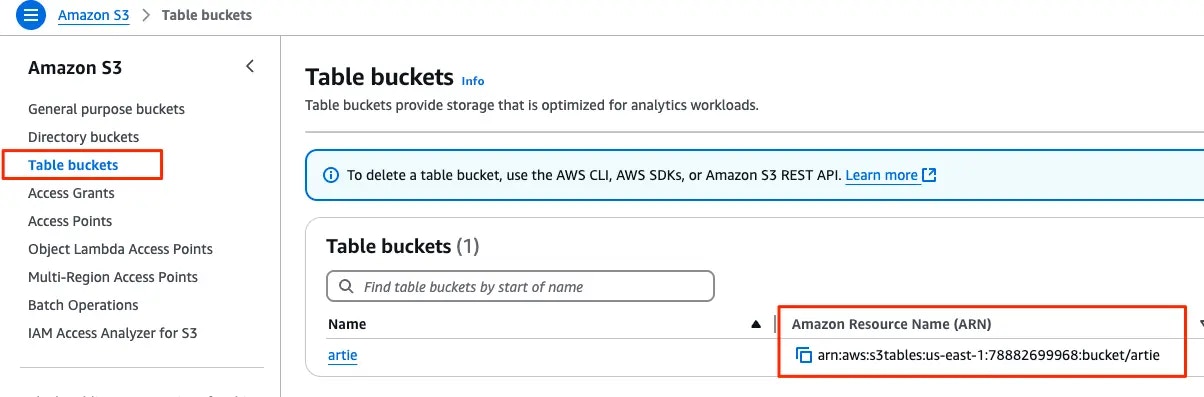
Creating a service account
The service account will need S3 Tables API access.Terraform script
Terraform script
Naming rules
S3 Tables only accepts certain table and namespace names. When you validate or deploy the pipeline, Artie checks every destination table name, history table name and namespace against these rules. A name that breaks one stops validation with an error that names it.
Namespace errors start with
namespace instead of table name. Artie lowercases namespaces before it checks them, so a source schema named Sales passes as sales.
To fix a table name error, set a valid Destination table name in that table’s advanced settings, then validate again. To fix a namespace error, change the destination namespace in the pipeline’s destination settings. See the S3 Tables naming rules.
Table format
S3 Tables pipelines create Iceberg v2 tables. The Table format setting stays on Iceberg v2, since Athena and StarRocks can’t read v3 tables yet. A pipeline saved with v3 stops validation withS3 Tables only supports Iceberg v2 tables, since Athena and StarRocks can't read v3. Set the table format to v2. Switch Table format to Iceberg v2 and deploy again.